
How to spot a fake bank statement: 7 checks
Last updated: 2026-07-09
A forged bank statement is one of the cheapest documents to fake — and one of the most expensive to trust by mistake. A tenant inflates a balance, a loan applicant edits a salary line, a marketplace buyer sends a doctored transfer confirmation. On screen the file looks perfect.
Below are seven checks you can run yourself before you rely on a PDF statement — no special software, just a PDF reader, a calculator and a few minutes. Work through them in order: the first three catch the majority of amateur forgeries.
Why fakes are getting harder to catch
Faking a statement used to mean clumsy work in an image editor, and the seams showed. Generative AI changed that: convincing fakes of bank statements, payslips and invoices can now be produced in seconds, with correct logos and plausible numbers. Surface appearance is no longer evidence of authenticity — you have to look at what sits underneath the page.
1. Read the PDF metadata
2. Compare the modification date with the statement date
3. Re-add the numbers
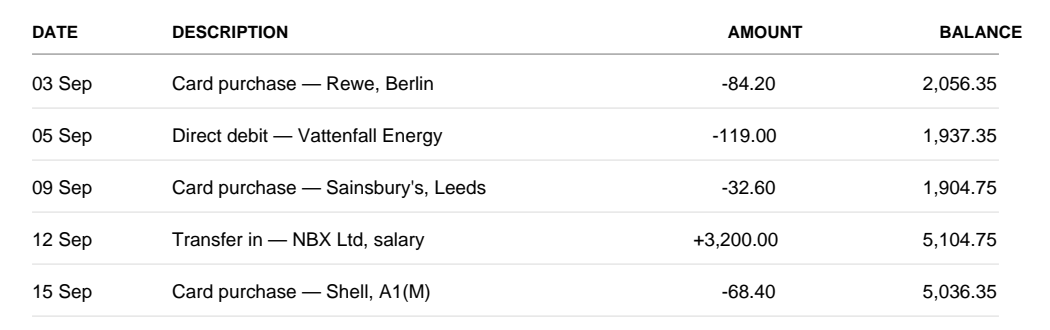
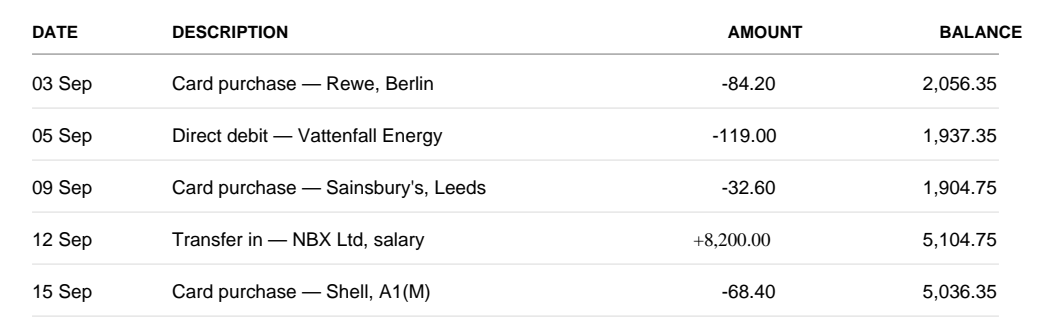
The salary line went from +3,200.00 to +8,200.00. The report names three traces in the file: that one amount is set in a different font from every other figure on the page, the file was modified three days after it was created, and its Producer field names Adobe Acrobat rather than the system that issued the statement. The running balance beside the edited line was never recalculated either.
4. Look at fonts and alignment, column by column
Banks render every column in one consistent font, size and alignment. An edited figure is often pasted in a slightly different font, weight or baseline. Zoom to 400% and scan down each column: a single number that sits a pixel high, or whose digits are shaped differently from their neighbours, is a tell.
5. Compare against a genuine statement from the same bank
If you have access to a genuine statement from the same bank — download one from your own bank's app or website — put the two side by side. Header layout, footer text, the position of the account number, the date format: forgers reproduce the obvious parts and miss the small ones.
6. Check logos, footers and the small print
Look at the logo at full zoom for soft edges or colour banding — a sign it was lifted from a screenshot. Read the footer: the support line, the registration number, the page-numbering style. These rarely change between a bank's real statements and are tedious to fake exactly.
7. When the stakes are high, run a forensic check
Why a screenshot or photo is never proof
If someone sends a photo or screenshot of a statement instead of the original PDF, treat it as a missing document, not a convenient one. An image strips out everything you would use to verify it — the metadata, the modification history, the embedded fonts — and leaves only the surface a forger fully controls. A genuine statement can always be exported as a PDF straight from online banking, so insistence on photos is itself a quiet red flag.
The seven checks at a glance
Run these in order before you trust a PDF statement. The first three catch most amateur fakes; the rest catch the careful ones.
- Metadata: does the Author or Producer name the bank, or an editor like Word, Canva or a photo tool?
- Modification date: was the file re-saved after the bank issued it?
- The maths: does opening balance plus credits minus debits equal the closing balance?
- Fonts and alignment: does any figure sit in a different font, weight or baseline?
- Side by side: does it match a genuine statement from the same bank?
- Logos and footers: are the logo edges crisp and the small print consistent?
- Forensic check: for high-stakes decisions, verify the internal PDF structure.
If the statement turns out to be fake
Do not act on it. A forged statement invalidates whatever it was meant to support — a loan approval, a tenancy, a sale — and proceeding can leave you liable for losses you could have avoided. Ask for the document again from a verifiable source: a statement exported directly from the issuer's online banking, or a confirmation sent by the bank itself.
Submitting a forged financial document to obtain credit, a tenancy or a refund is fraud in most jurisdictions and, in many, a criminal offence. If you are a business deciding on the document, keep the file and a note of what you found — it is the evidence that protects you later.
What your eyes cannot see
Related guides
Frequently asked questions.
Can I ask a bank to verify someone else's statement?
Usually not. Banks confirm account details only for the account holder, and data-protection rules stop them discussing anyone else's account. That is why lenders and landlords verify the document itself — its metadata, edit traces and balance maths.
What is the fastest way to tell if a bank statement is fake?
Check the PDF metadata and re-add the numbers. If the Producer field names an editor like Word or Canva instead of the bank's software, or opening balance plus credits minus debits does not equal the closing balance, the statement has been altered.
Can AI-generated bank statements be detected?
Yes. AI fakes look right on the surface but still carry traces in the file's internal structure — generator fingerprints, re-save layers, inconsistent fonts and metadata no bank's own software would leave. Forensic verification reads that internal structure instead of the picture on the page.
Checking these documents inside your product?
The same check runs as a REST API for software that receives documents from its users: