
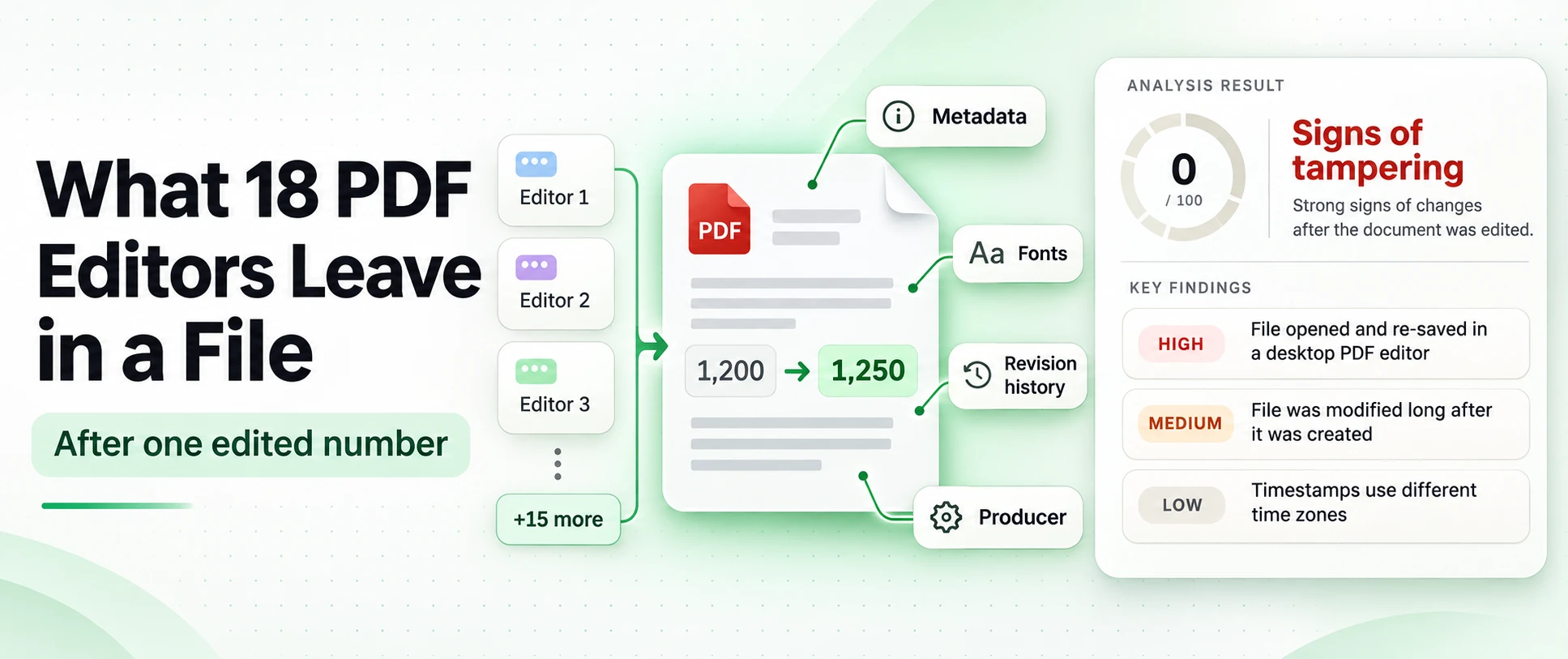
What 18 PDF editors leave in a file after one edited number
Smallpdf saved an edited bank statement with its original Producer and both original dates, so the metadata looks untouched. Inside the page, around the one typed digit, the editor left its own marker.
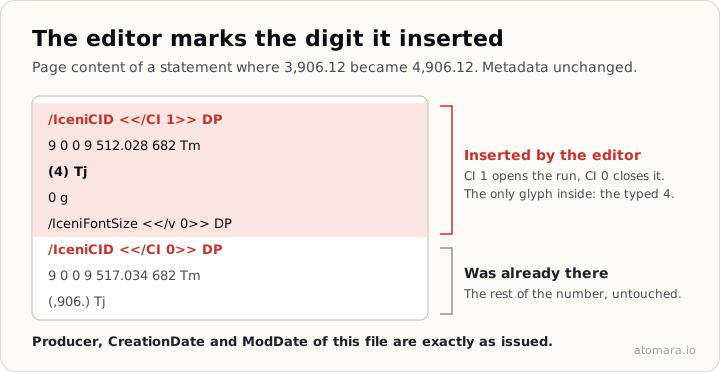
CI 1 opens a run of inserted characters and CI 0 closes it before the digits that were already there. The marker names the editing engine, Iceni Infix, and records which glyph was added.
Most writing on PDF tampering stops at a list of Producer strings. We could not find a systematic side-by-side test (the same documents, the same edit in every editor, a record of what changed), so we ran one and published the files.
The test
Seven invented documents, each made the way a real issuer would make one: a bank statement from ReportLab, a receipt from headless Chrome, an invoice exported from Apple Numbers, and one document each from TCPDF, mPDF, WeasyPrint and fpdf2. All are marked SAMPLE.
Each file went through one edit scenario, made by hand: one amount was changed (the closing balance, the total due, the net pay), usually with the figure that feeds it, so a scenario can touch more than one number. The edit-text function was used where the tool had one. The download was kept as it came. That gave 109 edited files from 17 online editors and desktop Word, made between 11 and 16 November 2026.
One caution: there is no unedited pass through each tool, so some traces show that an editor processed the file, not that a specific value was changed. Where the files themselves separate the two, we say so.
- 18 editors, 109 edited files, one to seven files per editor.
- In 8 editors the metadata fields were unchanged in every tested file.
- In 5 editors the original figure could still be read from the edited file.
- No editor returned a file without a trace: each of the 109 files carries at least one, in metadata, the header, page content, fonts or an earlier revision.
- Metadata alone is not enough, and no single trace proves fraud.
Metadata stayed silent in eight of the eighteen
iLovePDF, Smallpdf, Xodo, Lumin, LightPDF, PDFBear, PDFescape and HiPDF left the Producer and both dates exactly as they were in the original (HiPDF and Lumin are one file each). A check that reads the document properties and compares dates finds nothing wrong with any of their files.
Sample sizes vary from one to seven files per editor, and a field also counts as unchanged when it was absent in both versions: one of the originals has no Producer and no ModDate. These findings describe the tested files, not guaranteed behaviour on every document.
The reverse also fails. A Producer change alone proves little: opening a file in Preview and saving it, or printing it to PDF, rewrites it on files nobody edited.
Two editors went the other way and wrote the account into the file. Canva put the account holder's name in /Author. pdfFiller added an /Owner entry with the account's e-mail address. That is an attribution clue, not proof: an account identifier in metadata is not a signature and does not show who made the edit.
The old figure survives three ways
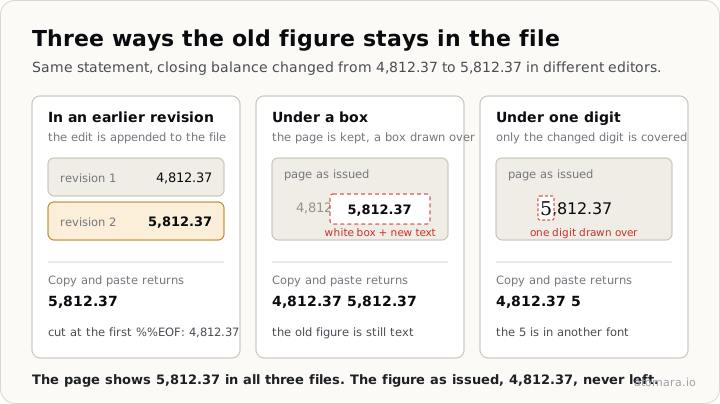
In an earlier revision. Acrobat online and HiPDF append the edit to the end of the file and leave the original bytes in place. Cut the file at the first %%EOF and you have the statement as it was issued: on the Acrobat online statement the first revision says 4,812.37 and the final one says 5,812.37.
Under a box. PDF2Go does not edit the text. It embeds the original page, draws a white rectangle over the figure and writes the new one on top. On screen the result is clean. Select the line and copy it, and you get both: Closing balance 4,812.37 5,812.37.
Under one digit. DocFly covered only the digit that changed. On screen the 5 of 5,812.37 is in a different font and size from the rest of the number. In the text layer the original 4,812.37 is intact, followed by a lone 5.
Searching a PDF for the figure you expected is still the cheapest check there is.
Marks and fonts the editors add
The traces that held up best were in page content and resources, where a metadata reader does not look:
/IceniCIDmarked content in every file from iLovePDF, Smallpdf, Xodo and Lumin. Their output is near-identical: the ReportLab statements from iLovePDF, Smallpdf and Xodo differ by under 100 bytes in size./TouchUp_TextEdit, Acrobat's tag for edited text, in four of Acrobat online's seven files.EmbeddedPdfPage, the pdf-lib library's name for an imported page, in every PDF2Go file.- A resource named
/APDE_E1in every LightPDF file, and random ten-letter resource names in DocHub and DocFly.
The files separate "processed" from "edited" on their own. The general Iceni tagging wraps the whole page, 29 to 84 objects per file, and says only that the file went through the editor. The CI 1 runs sit only where figures were edited: two to four per file, in all 22 files from these four editors.
A bank's statement server has no reason to write an editor's marked content into its pages.
Fonts are the other trace in page resources. The edited figure has to be drawn with glyphs the file contains, and the embedded fonts usually hold only the characters the document used. Acrobat online added a second subset of Arial next to the first. Sejda and PDFBear added Liberation Sans, PDFescape added Arimo: metric clones of Arial, so the figure lines up, but a one-page statement now lists two font families. pdfFiller renamed every font subset in the document.
The Iceni-based editors usually reused the existing font, since the digits were already in it; in 4 of their 22 files they added Arimo Bold. Their steady trace is the marker, not the font.
Re-creation erases the edit along with the original
Word converts the PDF to a document and writes a new PDF: Word's Producer, Word's dates, Calibri in the font list of 6 of 7 files, and no trace of ReportLab, TCPDF or any other generator. On the statement it also broke the layout: the balance column wraps mid-number and the table spills onto a second page. Canva does the same at a smaller scale and runs words together in the text layer.
These files carry no edit marks because no original structure is left to carry them. They answer a different question: why is a bank statement a Word document?
Every editor, one table
| Editor | How it saved | Producer and dates | Other traces | Old figure still in the file |
|---|---|---|---|---|
| Acrobat online | Appended an incremental update | Producer kept, ModDate updated | /TouchUp_TextEdit in 4 of 7; second subset of the same font | Yes, 7 of 7, first revision |
| HiPDF (1 file) | Appended an incremental update | Kept | None found | Yes, first revision |
| iLovePDF, Smallpdf, Xodo, Lumin (1 file) | Rewrote the file, edited text in place | All three fields kept | /IceniCID around the new glyphs, every file; Arimo Bold added in 4 of 22 | No |
| LightPDF | Rewrote, edited in place | Kept | Resource /APDE_E1; new figure split into separate text runs | No |
| PDFBear | Rewrote, edited in place | Kept | Free-version watermark on the page, every file; Liberation Sans in 5 of 7 | No |
| PDFescape | Rewrote, edited in place | Kept | Header changed to %PDF-2.0, every file; Arimo in 5 of 7 | No |
| Sejda | Rewrote | Producer is only a version string, 3.0.39 (5.1.26); ModDate in a different time zone from CreationDate in 6 of 7 | Liberation Sans | No |
| PDF Candy | Rewrote | Producer PDF Candy, new dates | Font copies named ArialMT-7888 and similar | No |
| DocHub | Rewrote | Producer DocHub, new dates | Random ten-letter resource names; a dochub.document.id entry | No |
| DocFly | Rewrote, drew over one digit | Producer DocFly | Random ten-letter resource names | Yes, 6 of 6, text layer |
| pdfFiller | Rewrote | Producer airSlate inc. Mellivora 3.27, new dates | Account e-mail in /Owner; every font subset renamed | No |
| PDF2Go | Embedded the page, drew a box and the new figure | Producer pdf-lib | XObject EmbeddedPdfPage | Yes, 7 of 7, under the box |
| TinyWow | Rebuilt with TCPDF around the original page | Producer TCPDF 6.6.5, new dates | Open Sans or Helvetica added in 4 of 7 | 2 of 7, under the new figure |
| Canva | Rebuilt the document | Producer Canva, new dates and /ID | Account name in /Author; merged words in the text layer | No |
| Word | Re-created the document | Producer names Microsoft Word, new dates | Calibri in 6 of 7; original structure gone; layout reflowed | No |
The same edits on two real invoices, which we do not publish, behaved the same way: the Iceni marker from iLovePDF, Smallpdf and Xodo, the old amount in Acrobat online's first revision and under PDF2Go's box.
What the test supports best: an original figure readable from an earlier revision or from under an overlay, and inserted-glyph marks around the changed digits. These point at the change itself. A different Producer, added fonts, editor resource names and a PDF 2.0 header are weaker: they show that a tool handled the file.
Check a file yourself
- Look at the revision structure. If a real earlier revision exists, compare its content with the current one. More than one end-of-file marker alone does not prove an edit: Word writes two with the same content.
- Search for the figure you expected, and copy the line the shown figure sits on.
- List the fonts. Two families, or two subsets of one font, on a single page deserve a look.
- Search page content and resources for
/IceniCID,/TouchUp_TextEditand imported pages. - Compare the Producer with what the issuer normally uses, but do not stop there.
Our free PDF metadata checker shows the saved versions, the fonts and the metadata in your browser; the file never leaves your device. The plain-language version of these checks is in how to tell if a PDF has been edited.
What Atomara flagged in these files
We ran the 109 files through our own engine. The signals it raised most often on these synthetic files: a PDF editor named as the Producer (39 files), a gap between the creation and modification dates (23), characters the editor itself marked as inserted (22), font inconsistencies (18), text retyped by an editor (11), hidden text under an overlay (9) and text that differs between revisions (7). One file can raise several signals.
These counts are not a detection rate: the set has no unedited controls, so it says nothing about false alarms. A document rebuilt from scratch, as Word and Canva do, leaves a structural check nothing of the original to read.
If you process documents at volume, the same checks run through the Atomara REST API: each analysis returns a verdict, a score and the signals behind them, so a reviewer sees why a file was flagged. Reference: API documentation.
A clean result means the file's structure gave no sign of an edit. Where the document came from is a separate question.
The dataset
The 7 originals, the 109 edited files, a per-file table and the scripts are public at github.com/atomara-io/pdf-editor-traces, data under CC BY 4.0 and code under MIT. The per-file measurements behind the table are in its results/traces.csv. If you use the files, cite this page.
Limits: one week, free tiers, a browser on macOS, hand-made edits that differ slightly between tools, and no unedited control pass. Online editors change their back ends without notice; this is how they behaved in November 2026. This is version 1: desktop editors, mobile apps and AI editors come next.