
Bank statements and payslips made in Canva: how to spot them
Canva is a good design tool. It is built for flyers, social posts and presentations, and it makes a clean, professional-looking page in minutes. That is exactly why it turns up in places it was never meant for: a bank statement or a payslip rebuilt from scratch, with the right logo, a tidy table and whatever income figure the applicant needed.
We see it in our own data. In our document fraud statistics for 2026, a few of the documents people checked named Canva as the software that wrote them — and most of those were flagged. No bank and no payroll system issues documents from a design app, so a statement or payslip that says it came from one has some explaining to do.
Here is how to spot one — most of it with tools you already have.
1. Look at who wrote the file
Every PDF records the software that produced it, in two fields: Producer and Creator. A statement exported by a bank's system names that system, or a reporting library behind it. A payslip from payroll software names the payroll software. A page built in Canva says Canva.
- In Adobe Acrobat or Reader: File → Properties → Description, then look at "PDF Producer" and "Application".
- In macOS Preview: Tools → Show Inspector, the first tab.
- In Chrome's PDF viewer: the ⋮ menu → Document properties.
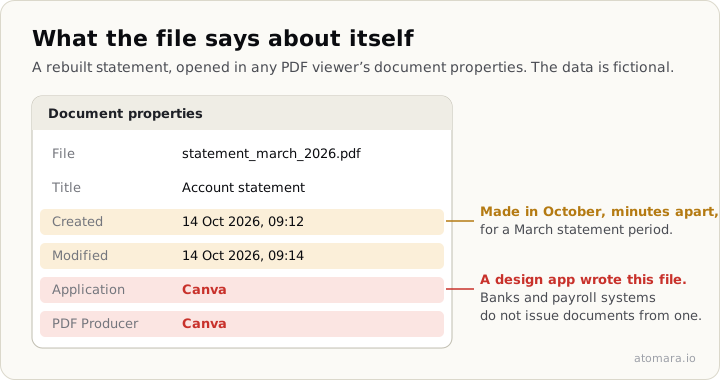
Or drop the file into our free PDF metadata checker, which reads it in your browser without uploading it.
A design app in that field on a bank statement is not proof on its own, but it is a question worth asking: why was a document that a bank generates opened and saved in a design tool at all?
One caution in the other direction. An empty Producer field proves nothing either way — about one document in five we see has none, for perfectly ordinary reasons. Treat a design tool in the field as a reason to look closer, and an empty field as no information at all.
2. Check the fonts
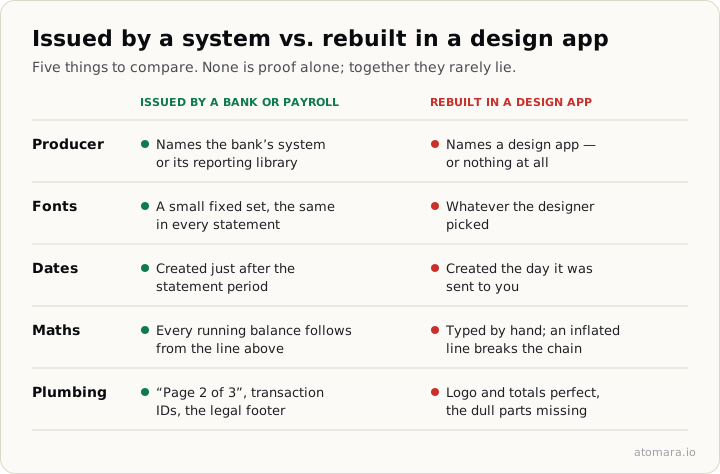
The same Properties window has a Fonts tab. Banks and payroll systems print statements in a small, fixed set of typefaces that repeats document after document. A page designed from scratch tends to use whatever the designer picked — often the popular web fonts a design tool offers by default, and sometimes the tool's own house font.
You do not need to know which font a given bank uses to make this check useful. Compare against a statement you know is genuine from the same institution — your own, or one received earlier — and see whether the font lists look alike. Then look at the page itself: one figure set in a slightly different weight or size from the numbers around it is the classic sign of an amount typed over.
3. Compare the dates with the statement period
The file also records when it was created and last modified. A statement for March is usually generated at the start of April. A file created in October for a March statement period was made long after the fact — possible for an honest re-download, but worth one question: "Could you download it again from your banking app and send me that file?"
A rebuilt document often has creation and modification times minutes apart on the day it was sent to you. A bank-generated file has a timeline that fits the statement.
4. Do the maths
A system-generated statement is arithmetically consistent, because a database produced it: opening balance plus credits minus debits equals the closing balance, and every running balance follows from the line above. A page designed by hand has to get every one of those numbers right by typing them, and an inflated salary line usually breaks the chain somewhere further down.
On a payslip the same check applies to gross minus deductions and the year-to-date totals: the year-to-date figure should grow by exactly the current period's amount from one payslip to the next.
5. Look for what a design never includes
Generated documents carry plumbing that nobody designs: page numbering in the form "page 2 of 3", reference or transaction IDs that follow a pattern, the institution's legal footer with its registration details, consistent date formats across every row. A page designed to look right often has the logo and the headline numbers perfect and the dull parts missing, inconsistent, or copied from somewhere else.
What to ask for instead
The single most effective step costs an honest applicant nothing: ask for the original file, downloaded again from their bank's app or online banking, or forwarded straight from the bank's own email. A genuine statement can always be produced that way in a couple of minutes. A rebuilt one cannot, and people who sent one tend to go quiet at this point.
Do not accept a screenshot or a photo of a screen as the replacement. A picture carries none of the traces above — no producer, no fonts, no history — and leaves only the surface, which is the one part a design tool gets right.
What an automated check adds
Everything above is something you can do by hand in a few minutes per document. An automated check runs the same questions — who wrote the file, how many times it was saved, whether the fonts and structure fit the software it claims, whether the balances add up — on every file, in seconds, and lists each finding with its evidence. No person reviews your document at any point. Upload a file on the homepage: the verdict appears at once, and the full report is free for your first 3 checks.