
What our PDF checks show: document fraud statistics for 2026
Most writing about document fraud quotes the same handful of industry surveys. This post is different: it describes the documents people actually brought to Atomara to check — bank statements, pay stubs, invoices, receipts and payment confirmations — between August and October 2026.
Every figure below is a share, rounded to a plain fraction. We do not publish how many documents we check, and nothing here describes a single file or a single person: the numbers come from automated verification results, not from anyone reading your documents, and the files themselves are deleted within 30 days.
About a third of the "PDFs" are really pictures
Roughly one document in three was a scan or a photograph wrapped in a PDF, rather than a file produced by the system that issued it. A phone camera, a scanner app or a "print to PDF" of a screenshot all produce the same thing: a picture of a page, with no text layer of its own.
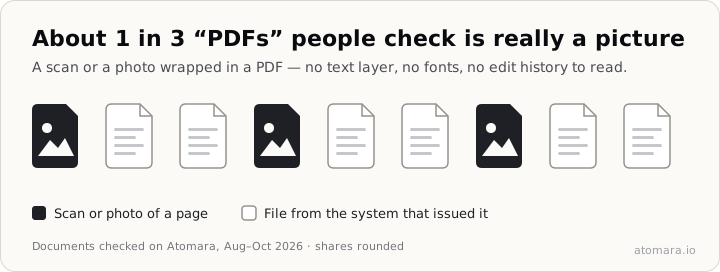
That matters more than it sounds. A picture has no edit history, no fonts and no numbers to add up — the traces that give an edited PDF away simply are not there. A scan can still be checked as an image, but it cannot tell you which document it was taken from.
The practical fix costs the honest applicant nothing: ask for the original file, downloaded again from their bank's app or online banking, rather than a scan or a photo of it. Our guide to spotting a fake bank statement walks through why the original is the one worth checking.
The most common answer is "inconclusive" — and that is honest
Across the documents we could read, the results split roughly like this:
- about a third came back inconclusive — some signals, nothing decisive;
- about one in four showed clear traces of editing;
- about one in eight was suspicious;
- about one in six showed no signs of editing at all;
- a handful were confirmed authentic outright — by a valid digital signature, or by a full match with a reference template learned from genuine documents of its issuer;
- the rest could not be analysed — no text layer, or a password the sender never shared.
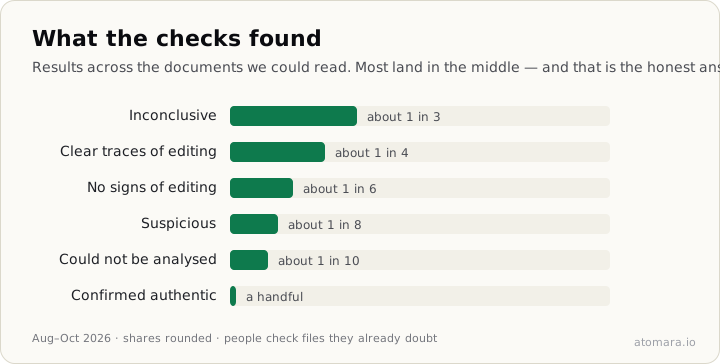
Two things are worth saying about that split. First, people check the documents they already doubt, so these shares describe a pile of files somebody had a reason to look at — not documents in general. Second, an inconclusive result is not a soft "fake". Bank portals re-render statements, email gateways strip metadata and phones re-save files; honest documents pick up odd traces all the time. The useful response to "inconclusive" is to ask for the original, not to reject the applicant.
We wrote more about this in designing for the inconclusive path, and about which conclusions a file's history can and cannot support in what PDF metadata can and cannot prove.
The file usually names the software that touched it last
Every PDF has a Producer field: the software that wrote it. In the documents we checked:
- about one in five had the field empty — sometimes a sign of a cleaned file, often just a generator that never fills it in;
- about one in eight was written by an office suite or a "print to PDF" driver;
- a smaller but steady group named an online PDF editor or Adobe Acrobat, and those were flagged far more often than the rest;
- a few were made in Canva — a design tool no bank or payroll system issues documents from.
A Producer field is a clue, not a verdict. Accountants export statements through Acrobat every day, and a document made in a word processor can be perfectly genuine. What stands out is a mismatch: a bank statement whose last writer is a design tool or an online editor, or a file whose structure does not match the software it claims to come from.
You can read these fields yourself without uploading anything: our free PDF metadata checker parses the file in your browser and shows the Producer, dates, revisions and fonts. How to tell if a PDF has been edited explains what each of them means.
A third of checks happen on a phone
About one check in three was made from a phone. Landlords answering an application between viewings, sellers checking a payment confirmation before handing over goods — document checks are increasingly done away from a desk, at the moment the document arrives.
When people named a specific reason for the check, it was most often a tenant application, followed by a borrower's documents.
A verdict takes about half a second
The median analysis took a little over half a second, and nine in ten finished in under four seconds. That is the time the engine spends reading the file — fonts, revisions, structure and, on statements, whether the balances add up — not a queue for someone to look at it. No person reviews your document at any point.
What to take from this
- Ask for the original download, not a scan or a photo. A third of the files we see could have been checked properly if they had been.
- Treat the Producer field as a question, not an answer. A design tool or an online editor on a bank statement is worth asking about; an empty field on its own is not.
- Do not reject on "inconclusive". It is the most common result for honest and dishonest files alike — follow up instead.
- Check at the moment the document arrives. It takes seconds, and the applicant is still in the conversation.
If you have a document in front of you now, upload it on the homepage: the verdict appears at once, and the full report — every signal and the evidence behind it — is free for your first 3 checks.
How these numbers were made
The figures cover documents checked through atomara.io between August and October 2026, excluding our own test files. They are computed from automated verification results — the verdict, the document class and the Producer field — never from the content of a document. Shares are rounded to plain fractions on purpose: they describe the pattern, and they are not a measure of how many documents we process. We will update this post as the picture changes.